PayPal is one of the world’s biggest online payment platforms, with approximately 400 million registered users. It is now the fifth most widely used payment method for internet transactions. PayPal is very popular, but is it secure? Read on to know about your PayPal security.
Table of Contents
How PayPal Protects Transactions
During the first quarter of 2021, the online payment giant processed over 3.74 billion transactions, totaling approximately 285 billion US dollars. PayPal uses “next-level encryption” to ensure the security of these transactions. They also provide security features such as two-factor authentication to further protect user accounts.
Aside from that, PayPal has a Bug Bounty Program, which pays out money to ethical hackers who find bugs in PayPal’s defense systems. These efforts, when combined, make PayPal a generally safe platform for monetary transactions. PayPal, like any other online platform, is not resilient.
Tips to Maintain your PayPal Security
Even with the most strict security measures in place, PayPal accounts are rarely hacked. This is generally the result of a PayPal user falling victim to a phishing scam or other type of fraud attempt in which they end up divulging their login credentials or other confidential info. The best part is that there are some simple tips you can take to maintain your PayPal security.
Two-Factor Authentication (2FA)
Enabling two-factor authentication is one of the simplest ways to ensure your PayPal security (and all online accounts, for that matter) (2FA).
PayPal allows you to add a second level of authentication to your account in two ways: by using a SecurityKey (you will receive a code via text message each time you log in) or by using a third-party authenticator app, such as Google Authenticator.
Do the following to enable two-factor authentication on your PayPal account.
- Go to your PayPal account and sign in.
- Profile Settings can be accessed via the dropdown menu next to your account name.
- Navigate to Log-in and Security.
- Scroll down and select Update on 2-Step Verification.
- Select the authentication method you want to use.
- Click Set It Up and then follow any additional instructions.
Avoid Public Wi-Fi
Free Wi-Fi at cafés, train stations, and airports may appear to be a great way to save money on mobile data while away from home. When you go online in a public place, however, you never realize who is watching or, worse, capturing all of the data you send online.
There are numerous threats associated with the convenience of using public Wi-Fi, particularly when transmitting sensitive financial information, so it’s critical to take precautions for your protection while connected to public Wi-Fi. To maintain your PayPal security, avoid using public Wi-Fi hotspots to access your PayPal account. If you need to check your PayPal balance or make a transaction, use your mobile data instead. You can follow these public Wi-Fi security tips.
Use a unique and strong password
In today’s internet world, using strong, unique login credentials is one of the simplest ways to maintain your PayPal security (and any other online account, for that matter). While your email address is frequently used as the user name, your password should be unique for each account.
This is where a password manager can help. You will be able to generate highly complicated passwords with the click of a button, whether you use a third-party password manager or the one built into your favorite browser. You’ll also be able to securely protect your new passwords and easily auto-fill them whenever you want to log in to an account.
Even if you still use the old “post-it note tied to your computer screen” method of password storage, create a strong password that is different from PayPal to keep your accounts safe.
Set Security Questions
Surprisingly, PayPal still provides security questions as a method of account protection. These are insecure in comparison to other tools because they are frequently easy to guess or figure out through social engineering.
As a result, on the Security page, click Update next to Security questions and make sure you don’t have any solid answers yet. If you do, you should change them to something more secure for your account. For best results, create a random collection of words and then save it a backup password in your password manager.
Disable Auto-Login
PayPal offers a convenience feature known as One Touch. This allows you to check out with PayPal in your browser window without logging in to your account. While this is convenient, it should not be used on shared computers or portable devices such as laptops.
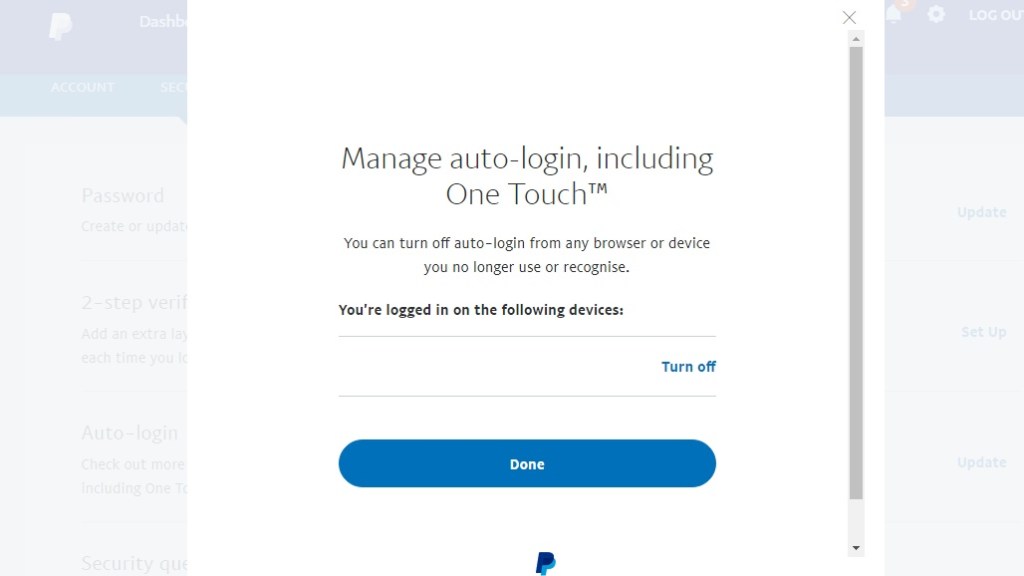
To turn it off, go to PayPal’s Security page and click Update in the Auto-login section. This will notify you if One Touch is enabled and provide you with the option to disable it.
Use a VPN
Using a Virtual Private Network (VPN) is one of the effective ways to prevent your PayPal account, especially if you need to access it when you’re not on your home network’s security. A VPN protects all data sent online, adding an extra layer of security to all of your online payments, including identifying and using your PayPal account.
A VPN is especially useful when traveling and connecting to a free hotspot. While it was previously advised against using public Wi-Fi to access your PayPal account, there are times when you have no other choice. The most common situation is that you are visiting another country and do not want to pay roaming fees for using mobile data. A VPN allows you to remain secure while connecting to a public network.
Conclusion
PayPal works hard to maintain a reliable and secure online financial transaction platform. They use a variety of techniques to keep their systems secure from hackers. Additionally, the platform provides users with additional features to help them secure their accounts.
PayPal users can also take additional steps to protect their individual accounts. PayPal is one of the most convenient methods of sending and receiving money just about everywhere in the world. Your PayPal account will be safe and secure if you maintain vigilance and good security habits.