There is a lot of misunderstanding about what OAuth 2.0 is. Some people think of OAuth as a login flow (similar to when you sign in to an app with Google Login), while others think of OAuth as a “security feature” and don’t know much more.
This blog explains what OAuth 2.0 is, how it works, and hopefully leaves you with an idea of how and where OAuth can help your application.
Table of Contents
What is OAuth 2.0?
OAuth 2.0 (Open Authorization) is a standard that allows a website or application to connect resources held by other web applications on behalf of a user. It replaced OAuth 1.0 in 2012 and has since become the industry standard for web authorization. Without ever sharing the user’s credentials, OAuth 2.0 offers consented access and limit the actions that the user app can perform on resources on behalf of a user.
Principles of OAuth 2.0
OAuth 2.0 is NOT an authentication protocol, but rather an authorization protocol. As such, it is intended primarily to grant access to a number of resources, such as remote APIs or user information.
Access Tokens are used in OAuth 2.0. An Access Token is a piece of information that represents the end-authorization user’s to access resources. OAuth 2.0 does not specify a format for Access Tokens. However, the JSON Web Token (JWT) format is frequently used in some contexts. Token issuers can now provide data in the token itself. Access Tokens may also have an expiry date for security reasons.
OAuth 2.0 Main Components
OAuth 2.0 has five main components that are as follows:
Scopes
When an app asks for permissions, you’ll see scopes on the authorization screens. They are collections of permissions requested by the client when asking for a token. These are coded by the app developer when creating the application. Scopes derive policy decisions about authorization from enforcement. This is the first important aspect of OAuth. The permissions are prominently displayed. They are not hidden behind an app layer that must be reverse-engineered. They’re often listed in the API documentation.
OAuth Actors
The following are the actors in OAuth flows:
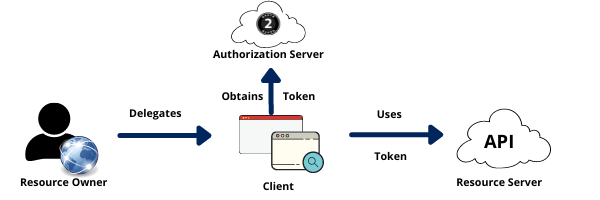
- Resource Owner: The data in the resource server is owned by the resource owner. For instance, I am the Resource Owner for my LinkedIn profile.
- Resource Server: The API that stores the data that the application wants to access is known as a resource server.
- Client: the application requesting access to your data.
- Authorization Server: The main OAuth engine.
Clients
Clients can be both public and private. In OAuth nomenclature, there is an important distinction between the two. Confidential clients can be relied on to keep a secret safe. They do not run on a desktop or are available through an app store. People cannot reverse engineer them in order to obtain the secret key. They are running in a secure environment where end-users cannot access them. Browsers, smartphone applications, and IoT devices are examples of public clients.
OAuth Tokens
Access tokens are the tokens used by the client to gain access to the Resource Server (API). They’re meant to be fleeting. Consider them in terms of hours and minutes rather than days and months. To obtain an access token, you do not need a confidential client. With public clients, you can obtain access tokens. They are intended to be optimized for internet-scale problems. Because these tokens are limited in duration and scale-out, they cannot be revoked; instead, you must wait for them to expire.
The refresh token is the other token. This has a much longer lifespan; days, months, and years. This can be used to obtain additional tokens. Applications usually require private clients with authentication to obtain a refresh token.
Authorization Server
The Identity Provider is trusted by the Authorization Server. The assertion is employed in order to obtain an access token from the token endpoint. This is fantastic for businesses that have engaged in SAML or SAML-related technologies and want to incorporate them with OAuth. Because SAML assertions are temporary, there are no refresh tokens and you must keep retrieving access tokens whenever the assertion expires.
How Does OAuth 2.0 Work?
To begin, before using OAuth 2.0, the Client must obtain its own login details, a client id, and client secret, from the Authorization Server in order to determine and authenticate itself when asking for an Access Token.
The Client, for example, a mobile app, website, smart TV app, desktop application, etc., initiates access requests using OAuth 2.0. The general flow of the token request, exchange, and response are as follows:
- The Client requests authorization (authorization request) from the Authorization server, providing the client id and secret for identification; it also offers the scopes and an endpoint URI (redirect URI) to which the Access Token or Authorization Code should be sent.
- The Authorization Server validates the Client’s identity and confirms that the requested scopes are permitted.
- To grant access, the Resource owner communicates with the Authorization Server.
- Depending on the grant type, the Authorization server returns to the Client either with an Authorization Code or an Access Token, as described in the very next section. In addition, a Refresh Token may be returned.
- The Client uses the Access Token to request access to system resources from the Resource Server.
Why Does Your Backup Needs OAuth 2.0?
Several Office 365 and G Suite backup solutions rely on service accounts, which require administrator privileges and privileged login details to access. A good backup solution, on the other hand, allows OAuth data transfers to occur in Secure Sockets Layer (SSL) to make sure that the most reliable cryptography industry protocols are used to keep your login information secure. While it is obvious that the right backup solution prevents sensitive information out of the hands of hackers, selecting the right backup solution for your company’s requirements is a crucial task.