
When you browse the web, you may come across a variety of online threats. And these threats aren’t limited to malicious websites. If you’re not careful, you could inadvertently infect your computer with malicious programs even when visiting the most legitimate of websites. What’s the reason? Malvertising
Table of Contents
What is Malvertising?
Adware and malvertising are frequently confused. This is due to the fact that both attacks depend on online advertising to cause damage. The key difference is that malvertising attacks originate from advertisements on legitimate websites. Malicious advertising campaigns in the past have targeted the websites of major corporations such as the London Stock Exchange, MSN, and Yahoo. Adware, on the other hand, is a malicious program that is already installed on your computer, software that you were most likely tricked into installing while downloading something else.
Malvertising attacks occur when cybercriminals insert malicious advertisements into online advertising networks. The malicious ads then appear on well-known and trusted websites, redirecting victims to corrupted websites or installing malware directly on their computer systems.
Malvertising, from the perspective of an attacker, is a relatively simple way to compromise reputable sites that receive a lot of traffic without having to directly target the websites. Exploiting legitimate advertising networks also allows hackers to overcome firewalls and compromise local networks. Malvertising is a rapidly growing threat because many of the more advanced attacks can infect you whether or not you click.
How does Malvertising work?
A “malvertiser” may use a variety of strategies, but the end result is almost always to get the user to install malware or to direct the user to a malicious server. Malvertisers frequently submit their malicious advertisements to third-party online ad vendors. If the vendor accepts the ad and the malvertiser wins their bid, the seemingly innocuous ad will be served on any number of sites with which the vendor is affiliated.
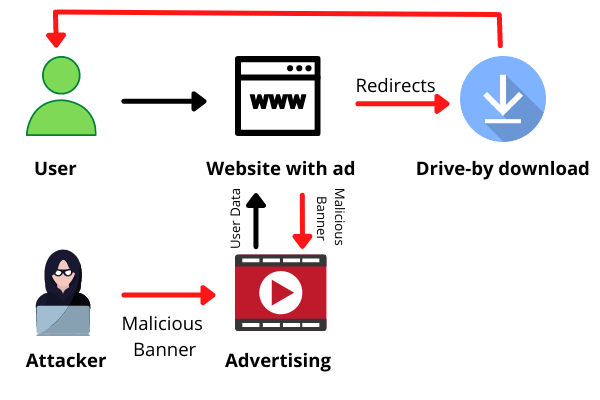
Malvertising is something that online vendors are aware of and effectively working to prevent, but it can be hard to detect. For any online ad services, it is essential to only work with trusted, prestigious vendors.
Risks of Malvertising
Malvertising campaigns and malicious advertisements can endanger your personal information. The following are the most concerning risks:
Hackers could steal your financial information.
Some malvertising is intended to trick you into disclosing personal information, particularly financial information. If hackers obtain access to your bank account details or passwords, they may drain your accounts without your knowledge.
Thieves may procure your credit card debt.
If hackers obtain your credit card information, they may use it to buy things for themselves. You can claim these charges, but you must first notice them, and if you don’t check your monthly credit card bills on a regular basis, you may end up paying for purchases you didn’t make.
Your computer might get infected.
It can also infect your computer with viruses and other malicious software. You might not even be aware that this malware is present. However, hackers may use it to monitor your keyboard strokes, hack your passwords, or take control of your computer.
Examples of Malvertising
Malvertising comes in many different shapes and sizes, but all of them can endanger your sensitive data. Here are some examples of common malvertising.
Redirection
When you click on a malware ad, you are frequently redirected to spoof sites that appear legitimate but are actually set up for phishing attacks, in which criminals attempt to trick you into providing personal information such as your Social Security number, credit card details, or bank account credentials. These sites are designed to appear legitimate, whether they are impersonating the websites of banks, credit unions, or credit card companies.
Malware
The other major type of malvertising is more effective and can infect your computer quickly. This variant of malware injects infected banner or box ads into legitimate websites that you may visit on a daily basis. Clicking on such an advertisement may result in the installation of spyware, viruses, trojans, or other malware attacks on your computer.
This type of malicious software is particularly dangerous because it frequently works in the background, stealing your personal and sensitive details, tracking your keystrokes, and checking your email messages without your knowledge.
You don’t always have to click.
You may believe you are immune to malvertising because you never click on online advertisements, including pop-ups. But here’s the scary part: even if you swear you’ll never click an ad again, you’re still vulnerable to malvertising.
That’s because drive-by downloads, a type of malware, can infect your desktop with spyware or malware as soon as carrying the virus page loads. You do not need to do anything to begin the process.
Tips to Avoid Malvertising
Avoiding malvertising is hard but it’s possible with some preventive tips:
Purchase an antivirus program.
Installing and running a reputable antivirus program on your computer is an effective way to defend yourself from malvertising. And, once you’ve installed antivirus software, ensure to approve any updates as soon as possible.
These updates are frequently designed to protect your device from specific types of malware, such as malvertising. If you fall behind on upgrades, your computer may become vulnerable.
Enable click-to-play in your browsers.
The “click-to-play” option is available in all browsers. By selecting this option, all online content that necessitates plugins to play — such as Java, Adobe Reader, QuickTime, or Flash — will be disabled unless you manually allow the content to play.
To effectively prevent yourself from malvertising, enable the “click-to-play” option in your browser’s settings. This will defend you against drive-by download malvertising. The method by which you access this option is determined by your browser.
Set up an ad blocker.
If a malicious online ad does not appear on your screen, you will not click on it by accident. That is the premise of ad blockers. If you install one — some are paid, while others are free — it will clear advertisements from web pages, potentially protecting you from malvertising.
However, keep in mind that not all ad blockers block all ads. Furthermore, if an ad blocker is enabled, some websites may not function properly.