As cybercrime continues to rise (see the most recent cybercrime report) and poses a threat to organizations worldwide, you are probably aware that your firm requires firewall security; in fact, you may already have firewall management software in place. But what really is firewall security? In this blog, you will discover firewall security, types, and management tips.
Table of Contents
What is Firewall?
A firewall is a network security device — either computer hardware or software — that can help protect your network by filtering traffic and preventing unauthorized access to your computer’s confidential data.
A firewall not only blocks unwanted traffic but can also help prevent malicious programs from infecting your computer. Different levels of protection can be provided by firewalls. The key is to determine how much protection you require.
How Does a Firewall Work?
To begin, a firewall security system evaluates network traffic as per rules. A firewall only accepts incoming connections that have been configured to accept them. This is performed by permitting or blocking specific data packets — units of communication sent over digital networks — based on predefined security criteria.
A firewall functions as a traffic cop at your computer’s entrance point, or port. Only verified sources (or IP addresses) are permitted. IP addresses are significant because they identify a computer or source in the same way that your postal address indicates where you live.
Types of Firewall
Firewalls can be software or hardware. Each format serves a different yet important role. A hardware firewall is a physical device, similar to a broadband router, that is installed between your network and gateway. A software firewall is an inner program that works with port numbers and programs on your computer.
There are also cloud-based firewalls, referred to as Firewall as a Service (FaaS). One advantage of cloud-based firewalls is that they can expand with your organization and, like hardware firewalls, perform well in perimeter security.
Firewalls are classified into various types based on their structure and functioning. Depending on the size of your network and the degree of security required, the following firewalls can be installed.
Packet-filtering firewall
A packet-filtering firewall is a network management system that can restrict network traffic based on the IP protocol, an IP address, and a port number. This is the most basic sort of firewall and is intended for smaller networks.
But be careful. While packet-filtering firewalls are useful, they are not without limitations. A packet-filtering firewall does not prevent web-based threats because all web traffic is allowed. As a result, additional protections are required to distinguish between friendly and fraudulent web traffic.
Proxy service firewall
By filtering information at the application layer, the proxy service firewall security can help protect your network security. It simply acts as a gateway or intermediary between your internal network and external web servers. It is more secure than a traditional firewall because it analyzes incoming traffic using stateful and deep packet inspection technology.
Stateful Multi-layer Inspection (SMLI) firewall
The stateful multi-layer inspection firewall is common firewall security that keeps track of existing connections. It filters traffic using state, host, and protocol filters, as well as administrator-defined rules and context. This includes using data from previous connections as well as packets from the same connection.
To keep track of all internal traffic, most firewalls use stateful packet inspection. This firewall goes above and beyond packet filtering by using multi-layer monitoring. However, it cannot discriminate between good and malicious online traffic, thus you may need to use other software.
Network firewall Vs Host-based firewall
There are differences between host-based and network-based firewalls, as well as advantages of using both.
Network firewalls filter traffic to and from secured local area networks (LAN) on the internet. They are commonly used by organizations that require the protection of a wide network of computers, servers, and employees. A network-based firewall can monitor communication between a company’s computers and external sources, as well as block access to specific websites, IP addresses, or other services.
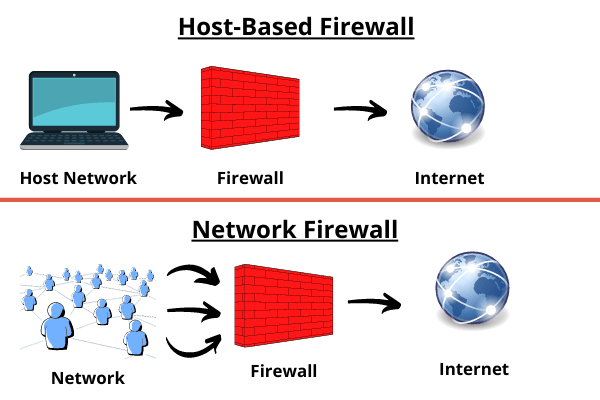
Host-based firewalls operate similarly but are kept locally on a separate computer or device. A host-based firewall is a software tool or set of apps that allow better control. They are installed on each server and manage incoming and outgoing traffic, as well as choosing whether to allow traffic to certain devices and protecting the host.
How to use firewall protection?
Proper firewall configuration and maintenance are important for keeping your network and devices secure. Here are some tips to help you improve your firewall security practices:
- Always keep your firewalls up to date as soon as possible: Firmware updates keep your firewall-protected against newly found vulnerabilities. Personal and home firewall users can usually update instantly without risk. Larger businesses may need to examine network configuration and compatibility first. However, everyone should have procedures in place to ensure that updates are made as soon as possible.
- Use antivirus software: Firewalls are not designed to prevent viruses and other attacks. These may bypass firewall security, requiring the use of a security solution designed to disable and delete them. Instead, you can use VPN for additional security.
- Segmented network: Malicious actors’ lateral mobility is a clear risk that can be minimized by limiting internal cross-communication.
- A whitelist to limit the number of available ports and hosts: Inbound traffic should be blocked by default. Inbound and outbound connections should be limited to a strict whitelist of authorized IP addresses. Limit user access privileges to only those that are absolutely necessary. It is easier to maintain security by allowing access only when necessary rather than revoke and reduce harm after an attack.
- To avoid downtime, maintain active network redundancy: Backups of data for network hosts and other critical systems can help to prevent data loss and reduced productivity during an incident.
Why do we need a firewall?
You might be using safe internet practices like not clicking on suspicious links or attachments, only visiting trusted, well-known websites, and using strong, unique, complex passwords for each online account, and keeping them up to date.
Is all of this enough to keep you safe? The answer is “no.” It’s a good idea to have a firewall security in place if you use the internet. A firewall can help you to:
- Prevent unauthorized remote access
- Make online gaming secure
- Protect your data, network, and device
Cyberthreats are diverse and constantly evolving. It is essential to adopt available defenses to aid in the protection of your network and the personal information stored on your computer against cybercrime.